
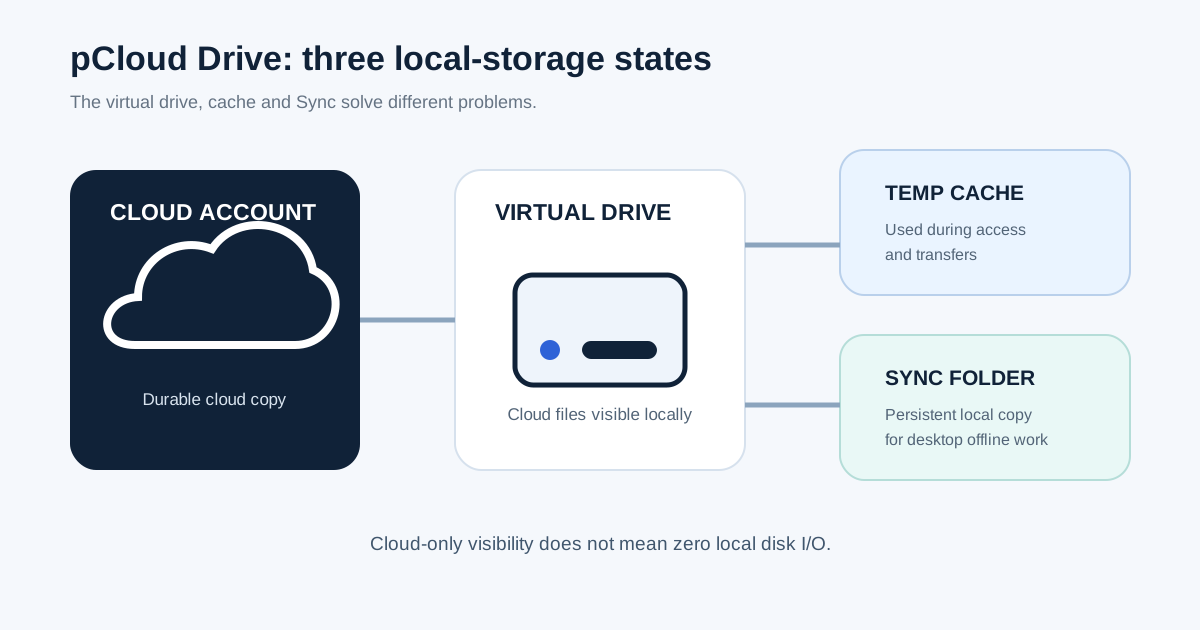
Short answer: pCloud Drive is designed so your cloud library does not have to exist as a full local copy on your computer. But that does not mean the desktop app never uses your SSD. pCloud documents that it temporarily uses local disk space when files are uploaded or accessed, and it exposes settings for cache size and minimum free disk space. If you need guaranteed offline access on desktop, pCloud uses a different mechanism: Sync creates a persistent local folder that mirrors a cloud folder in both directions.
It supports file access and transfers. It is not the same thing as deciding that an entire folder must remain locally available.
The folder exists on your disk and in pCloud, with changes reflected in both directions when the connection is active.
This matters most to the exact user who is attracted to a virtual drive in the first place: someone with a relatively small SSD and a cloud library that is much larger than the computer. If you have a 512 GB laptop and several terabytes of cloud data, pCloud Drive can remove the requirement to mirror the whole library locally. But if your free space is already close to zero, the remaining cache requirement can still become the bottleneck.
If local storage pressure is the reason you are evaluating cloud storage, start with Cloud Storage vs External Hard Drive. If the problem started with a full Google account rather than a full laptop disk, diagnose the Google storage quota first.
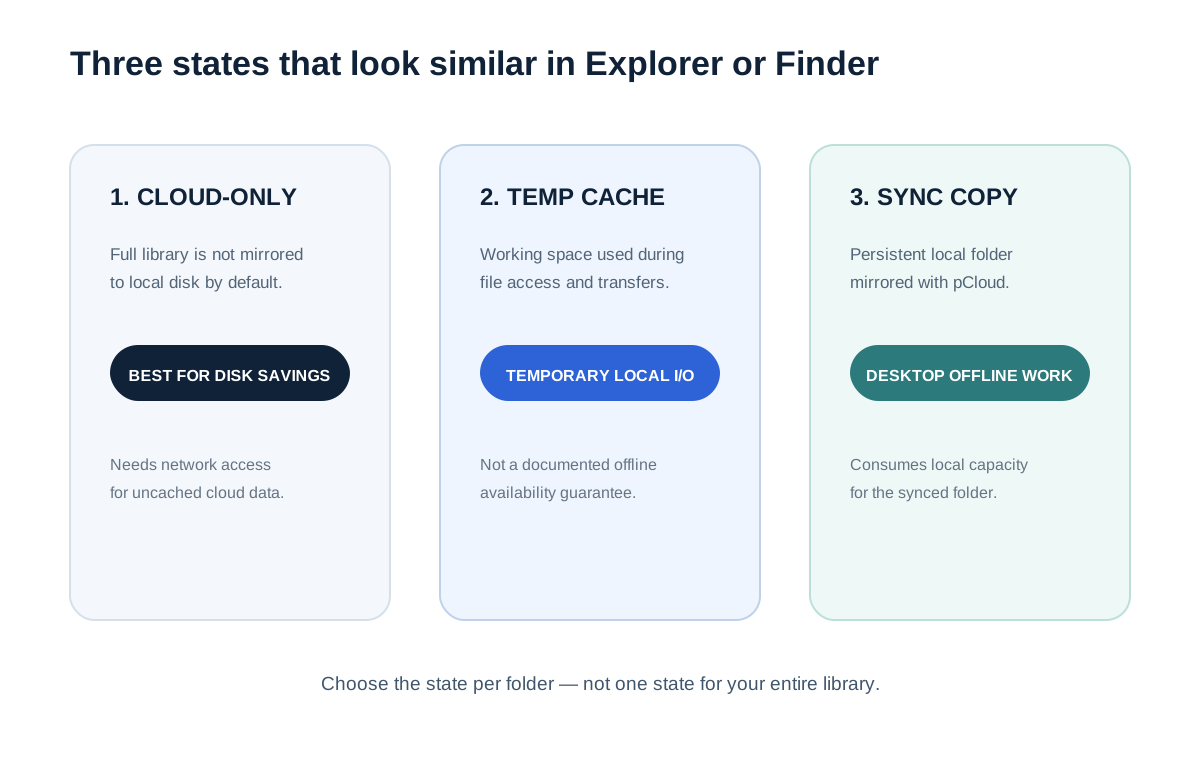
Think of pCloud Drive as three storage states, not one folder
The easiest way to understand pCloud Drive is to stop thinking in terms of “the file is either on my computer or in the cloud.” The desktop app creates several different states with different disk-space and availability consequences.
| State | Where the durable copy lives | Local disk use | Works offline? |
|---|---|---|---|
| Cloud-only through pCloud Drive | pCloud account | No full persistent mirror by default; local cache may be used when files are accessed or transferred | Do not assume it |
| Temporary cache | Still fundamentally cloud-backed | Temporary working space controlled by pCloud Drive disk-usage settings | Cache should not be treated as an offline guarantee |
| Synced local folder | Both the local folder and pCloud | Persistent local copy consumes disk space | Yes; desktop offline access is implemented through Sync |
pCloud's current help documentation describes pCloud Drive as a virtual drive that lets you access files without storing the entire cloud library locally. It separately describes Sync as a bidirectional connection between a local folder and a folder in pCloud. That means the disk-saving architecture and the offline-work architecture are deliberately different.
The virtual drive saves space by avoiding a full local mirror
When pCloud says that Drive can save hard-disk space, the practical meaning is that your entire cloud account does not have to be duplicated onto the computer just to appear in the filesystem. You can browse the virtual drive and open cloud files on demand. That is fundamentally different from a conventional mirrored sync folder, where the local copy itself is part of the operating model.
For a small-SSD laptop, that distinction is significant. A 2 TB cloud library does not require a 2 TB internal SSD merely to be visible in pCloud Drive. This is one reason a storage-first service can be attractive to users whose main problem is local capacity rather than office-suite collaboration.
But the useful sentence is not “pCloud Drive uses no local storage.” The accurate sentence is narrower: pCloud Drive does not require the full cloud library to be stored locally by default. pCloud's own settings documentation then makes the second half explicit: uploading or accessing files can temporarily consume local disk space for cache.
Local cache is the hidden reason a “cloud-only” workflow can still hit a full SSD
pCloud exposes a Disk usage section in the desktop settings. Its current documentation says this section lets you set minimum free disk space, adjust cache size, and clear local cache. It also states that pCloud Drive requires a minimum amount of free disk space to work correctly; the documented default is currently 2048 MB. The same page says the minimum recommended cache value is currently 5120 MB.
Those numbers are not a promise that every transfer needs exactly 2 GB or 5 GB. They are application settings, not a formula for your workload. The operational point is more important: the virtual drive still needs breathing room on the local filesystem.
That becomes visible when a laptop is already critically full. pCloud's low-disk-space documentation says copying large files to pCloud Drive can use part of the local disk as temporary cache, and that insufficient free space can slow transfers or affect upload performance.
What the cache is doing during transfers — and what pCloud does not document
pCloud explicitly documents the purpose of cache at a high level: temporary local disk space makes uploads and downloads smoother and can reduce interruption risk when the connection is unstable. Its file-management documentation repeats that files uploaded through pCloud Drive can use local cache during the transfer.
There is a point where the public documentation stops, and that boundary matters in a technical article.
| Question | Publicly documented? | What we can safely say |
|---|---|---|
| Does pCloud Drive use local cache? | Yes | pCloud says access and transfers can temporarily use local disk space. |
| Can the user configure cache size? | Yes | The Disk usage settings expose cache size and cache clearing. |
| What happens when cache capacity is reached? | Documented in a 2017 pCloud technical note | pCloud said newer cached files overwrite older cached versions once the overall cache size is reached. The note does not name a formal eviction algorithm. |
| Does opening a file always cache the entire file? | Not publicly documented | The documentation confirms cached data, but not the exact read granularity for every file type and access pattern. |
| How long can a cached version remain? | Partially documented | pCloud's 2017 technical note says cached versions remain until the configured cache fills and newer cached files replace older ones. It does not define a fixed retention timer. |
| What exact chunk size does a transfer use? | Not publicly documented | Avoid inventing transfer-block sizes. |
pCloud's current Help Center documents the configurable cache and minimum-free-space controls, while an older official technical note from 2017 adds more lifecycle detail: cached versions were described as remaining until the configured cache size was reached, after which newer cached files replaced older cached versions. That still does not reveal the exact transfer chunk size or guarantee the read granularity for every file type. For capacity planning, use the documented controls without inventing those lower-level implementation details.
Copying into pCloud Drive and using the Upload feature are not the same transfer path
One of the more technically useful details in pCloud's current documentation is its recommendation for low-disk-space situations. When you copy a large file directly into pCloud Drive, the application may use local cache as part of the transfer. pCloud says its separate Upload feature is an alternative for large uploads and specifically states that this method does not rely on local disk caching in the same way.
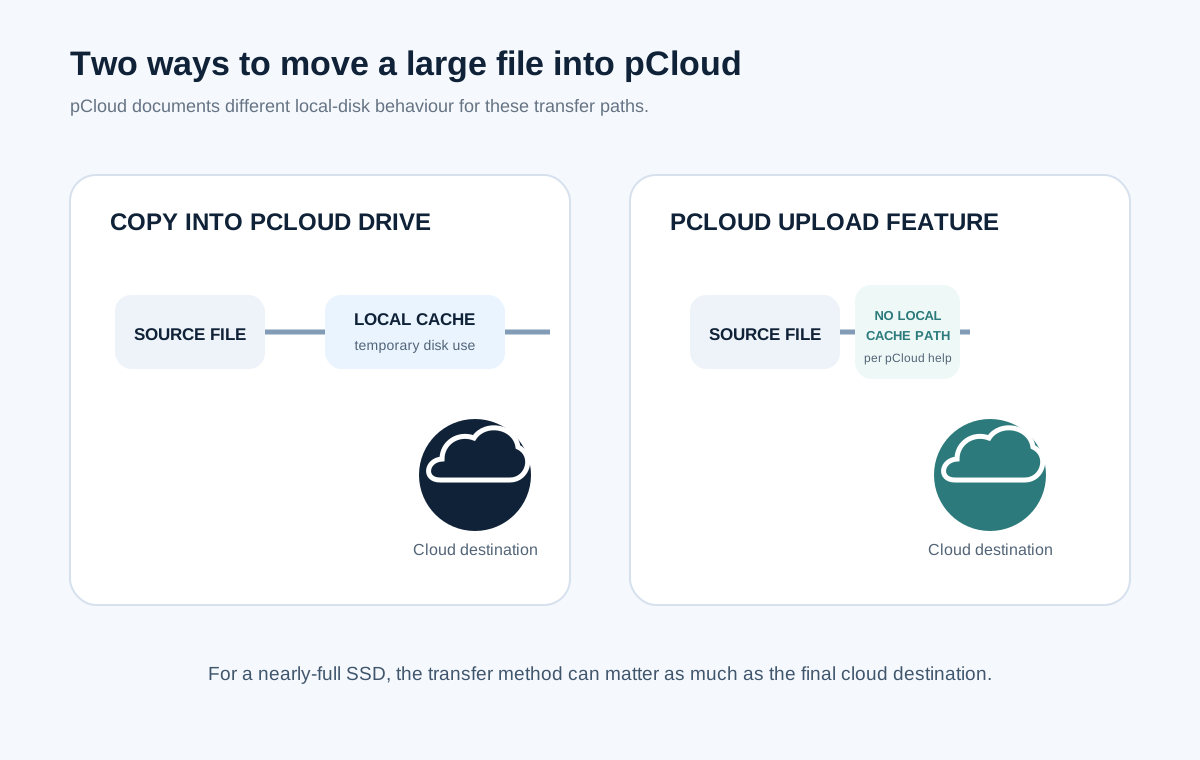
This is exactly the kind of technical detail that changes the decision for a nearly-full laptop. A service may be cloud-first at the storage layer while a particular ingest method still needs local working space.
Cache is not offline access; Sync is the desktop offline mechanism
If you have opened a file once and know that pCloud Drive uses cache, it is tempting to assume that the file is now safe to use without a network connection. That is not the model pCloud documents for desktop offline work.
pCloud's Offline Access documentation says desktop offline access is achieved through Sync. A local folder is linked bidirectionally with a cloud folder. When you are offline, you work directly on that local folder; when the connection returns, changes are synchronized.
That creates a clear architecture choice:
- Use the virtual drive when saving local disk space matters more than guaranteed offline availability.
- Use Sync when selected folders must remain fully usable without the network and you accept the local disk cost.
- Use both selectively when a large archive can stay cloud-first but a smaller active working set needs a persistent local mirror.
The third pattern is often the most practical. Many people do not actually need their entire multi-terabyte archive offline; they need a few current projects offline and everything else visible on demand.
If you are treating Sync as protection against data loss, stop there and separate the concepts. Cloud Backup vs Cloud Storage explains why a bidirectional sync relationship is not automatically a complete backup strategy.
A large-file workflow exposes the difference fastest
Consider a laptop with limited free space and a 100 GB video archive. The architectural question is not simply whether the account has enough cloud capacity.
If the archive lives in pCloud Drive as cloud-first data, the full 100 GB does not need to remain as a permanent local mirror. But when files are uploaded or accessed, pCloud can still need temporary cache. If the system has only a few gigabytes free, transfer behaviour becomes the immediate constraint even though the long-term storage destination is the cloud.
If the same 100 GB folder is configured with Sync for offline use, the model changes completely: the local folder itself becomes a persistent part of the workflow. That is appropriate when you need offline editing, but it eliminates most of the disk-saving advantage for that folder.
The right question therefore becomes: how large is the working set that must be local, not how large is the total archive?
local disk pressure ≈ active synced set + temporary cache + application scratch space
This model matters for photographers, video editors, developers with large project trees, and anyone whose applications create their own temporary files on top of pCloud's cache. A machine can have plenty of cloud capacity and still be operationally starved for local working space.
Clearing cache can recover disk space, but it does not replace storage planning
pCloud Drive's settings include a control to clear local cache. That can be useful when temporary data has accumulated and you need to reclaim local space. But clearing cache does not change the underlying workflow. If every day involves large transfers on a laptop that is permanently close to full, the same pressure will return.
That is why cache tuning is best treated as an operating control, not a way to cheat the filesystem indefinitely. If the working set itself is too large, your durable choices are different: keep more free local space, move active data to larger local storage, reduce what is synced offline, or change how large uploads enter the cloud.
For the broader hardware-versus-cloud trade-off, compare cloud storage with an external drive. For users leaving a productivity-suite storage model because the archive itself has become the problem, Google Drive Alternatives is the next layer up.
Where the pCloud Drive model is strong — and where it is the wrong abstraction
You want the namespace visible from the computer without permanently mirroring the full library.
Your connection is reliable and only a subset of files needs to be local at any one time.
You will end up using Sync for those folders, so local capacity still matters.
Cache and application scratch space can become transfer bottlenecks even if the archive itself is cloud-first.
If your main decision is provider selection rather than cache architecture, use the pCloud vs Sync.com vs Internxt framework. If you have already decided the product fits and the remaining question is how to pay for long-term storage, only then does the pCloud Lifetime break-even analysis become relevant.
Check the current pCloud plans only after you know how much of your library must stay local.
A virtual drive is most useful when the total cloud library is much larger than the active offline working set. If nearly everything must remain local, the storage plan is not the part that removes your disk constraint.
See whether pCloud fits your storage model → Affiliate link · Opens pCloud's current personal plans. Verify current capacity, price and terms before choosing.Bottom line: cache is the bridge between cloud-only and local work
The useful mental model is simple: pCloud Drive can keep the durable library in the cloud, cache provides temporary local working space, and Sync creates the persistent offline copy. Those are three different storage states with three different disk-space consequences.
If you remember only one technical warning, make it this one: virtual drive does not mean zero local I/O. It means you are no longer required to keep the entire cloud library as a permanent local mirror. Transfers and access can still need local cache, and desktop offline work still needs a local Sync copy.
The remaining question is therefore not “Does pCloud Drive use my SSD?” It clearly can. The useful question is which part of your dataset is cloud-only, which part is temporarily cached, and which part genuinely needs to be synchronized offline. That classification tells you whether the architecture will actually solve your storage problem.
Sources and verification
pCloud desktop behaviour and settings can change. We checked the following current first-party documentation on 9 August 2026:
- pCloud Help — pCloud Drive Settings Overview
- pCloud Help — Low disk space warning in pCloud Drive
- pCloud Help — pCloud Drive vs (pCloud) Sync
- pCloud Help — Offline Access
- pCloud Help — Uploading, Downloading, and Organizing Files
- pCloud Blog — How does pCloud Drive's cache work (2017 technical note)